极简一键脚本 搭 V2Ray 梯子 VLESS + WebSocket + TLS + Caddy v2 伪装反代网站 多path多用户
本文献给相信 VLESS + WebSocket + TLS + Caddy v2 前置是最适合自己的翻墙方式的朋友。
-- 本文是一个存档。更新的教程在这里 https://blog.icdyct.nyc.mn/2022/11/v2ray-vless-vmess-websocket-cdn-tls-caddy-v2.html
一键执行
bash <(curl -L https://github.com/crazypeace/V2ray_VLESS_WebSocket_TLS_CaddyV2/raw/main/install.sh)
这个一键脚本超级简单。有效语句11行(其中BBR 5行, 安装V2Ray 1行, 安装Caddy 5行)+Caddy配置文件15行(其中你需要修改4行)+V2Ray配置文件89行(其中你需要修改2行), 其它都是用来检验小白输入错误参数或者搭建条件不满足的。
你如果不放心开源的脚本,你可以自己执行那11行有效语句,再修改104行配置文件中的6行,也能达到一样的效果。
GitHub:https://github.com/crazypeace/V2ray_VLESS_WebSocket_TLS_CaddyV2
前提条件
一个已经解析到你的VPS的IP的域名
如果还没有,可以去Freenom申请一个免费域名,也可以买一个.xyz域名首年$0.99
还可以试试 申请免费.dev .app域名运行脚本之前不要打开CDN(Cloudflare的小云朵). 如果你是使用Hax提供的免费域名, 请将"CF Proxy" 设置为"NO".
如果你是用的Cloudflare的DNS,需要将SSL/TLS设置为Full完全。
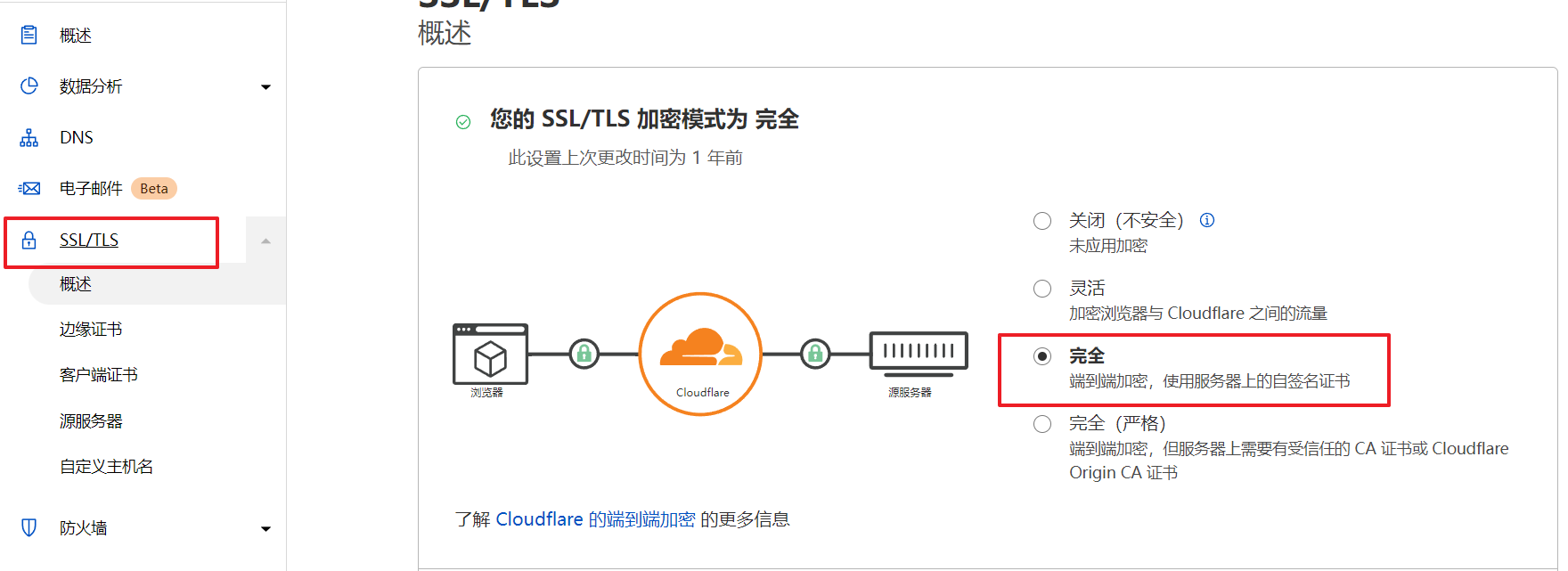
具体安装过程说明
bash <(curl -L https://github.com/crazypeace/V2ray_VLESS_WebSocket_TLS_CaddyV2/raw/main/install.sh)
每个需要输入的地方都有提示
脚本问你域名时 填写已经解析到你的VPS的IP的域名
如果是IPv4+IPv6双栈的小鸡, 问你IPv4还是IPv6时 请按域名的解析情况填写. 解析为IPv4就输入 4, 解析为IPv6就输入 6. 单栈的小鸡直接按回车, 脚本会自动处理.
其它选项都可以回车使用脚本随机生成的默认值.
最后一步脚本会提示你安装WARP帮你把小鸡添加为IPv4+IPv6双栈出站的小鸡, 方便后续处理比如Google人机验证,Youtube不让评论等问题. 如果你不想装WARP, 此时Ctrl+C中断即可.
脚本执行完, 在你验证了梯子可以成功连上之后, 再打开CDN.
多path方案实现多用户共享

然后重启caddy
service caddy restart
然后Caddyfile.multiuser文件中的每一个path都可以做为新节点的path参数。

跳过各种参数校验 快速安装
带参数 域名 IP栈 UUID path 运行 极简一键V2Ray脚本 跳过检测逻辑
无限多域名
前置Caddy V2使用on_demand模式 自动申请证书 相当于有无限的域名
示例安装日志
root@391932510hax:~# bash <(curl -L https://github.com/crazypeace/V2ray_VLESS_WebSocket_TLS_CaddyV2/raw/main/install.sh)
% Total % Received % Xferd Average Speed Time Time Time Current
Dload Upload Total Spent Left Speed
0 0 0 0 0 0 0 0 --:--:-- --:--:-- --:--:-- 0
_ ___
___ ___ __ __ ___ _| | _|___ __ __ _ ___
|-_ |_ | | |-_ | _ | |- _| | |_| |_ |
|___|___| _ |___|___|_|_|___| _ |___|___|
|_____| |_____|
此脚本仅兼容于Debian 10+系统. 如果你的系统不符合,请Ctrl+C退出脚本
可以去 https://github.com/crazypeace/V2ray_VLESS_WebSocket_TLS_CaddyV2 查看脚本整体思路和关键命令, 以便针对你自己的系统做出调整.
有问题加群 https://t.me/+D8aqonnCR3s1NTRl
----------------------------------------------------------------
100 17992 100 17992 0 0 85270 0 --:--:-- --:--:-- --:--:-- 85270
Hit:1 http://security.debian.org/debian-security bullseye-security InRelease
Hit:2 http://deb.debian.org/debian bullseye InRelease
Hit:3 http://deb.debian.org/debian bullseye-updates InRelease
Get:4 https://dl.cloudsmith.io/public/caddy/stable/deb/debian any-version InRelease [7,491 B]
Fetched 7,491 B in 2s (3,940 B/s)
Reading package lists... Done
Building dependency tree... Done
Reading state information... Done
89 packages can be upgraded. Run 'apt list --upgradable' to see them.
Reading package lists... Done
Building dependency tree... Done
Reading state information... Done
curl is already the newest version (7.74.0-1.3+deb11u1).
jq is already the newest version (1.6-2.1).
qrencode is already the newest version (4.1.1-1).
sudo is already the newest version (1.9.5p2-3).
0 upgraded, 0 newly installed, 0 to remove and 89 not upgraded.
安装V2ray最新版本
----------------------------------------------------------------
% Total % Received % Xferd Average Speed Time Time Time Current
Dload Upload Total Spent Left Speed
100 21647 100 21647 0 0 113k 0 --:--:-- --:--:-- --:--:-- 113k
info: No new version. The current version of V2Ray is v4.45.0 .
安装Caddy最新版本
----------------------------------------------------------------
sudo: unable to resolve host 391932510hax.localdomain: Name or service not known
Reading package lists... Done
Building dependency tree... Done
Reading state information... Done
apt-transport-https is already the newest version (2.2.4).
debian-archive-keyring is already the newest version (2021.1.1).
debian-keyring is already the newest version (2021.07.26).
0 upgraded, 0 newly installed, 0 to remove and 89 not upgraded.
sudo: unable to resolve host 391932510hax.localdomain: Name or service not known
File '/usr/share/keyrings/caddy-stable-archive-keyring.gpg' exists. Overwrite? (y/N) y
sudo: unable to resolve host 391932510hax.localdomain: Name or service not known
# Source: Caddy
# Site: https://github.com/caddyserver/caddy
# Repository: Caddy / stable
# Description: Fast, multi-platform web server with automatic HTTPS
deb [signed-by=/usr/share/keyrings/caddy-stable-archive-keyring.gpg] https://dl.cloudsmith.io/public/caddy/stable/deb/debian any-version main
deb-src [signed-by=/usr/share/keyrings/caddy-stable-archive-keyring.gpg] https://dl.cloudsmith.io/public/caddy/stable/deb/debian any-version main
sudo: unable to resolve host 391932510hax.localdomain: Name or service not known
Hit:1 http://security.debian.org/debian-security bullseye-security InRelease
Hit:2 http://deb.debian.org/debian bullseye InRelease
Hit:3 http://deb.debian.org/debian bullseye-updates InRelease
Get:4 https://dl.cloudsmith.io/public/caddy/stable/deb/debian any-version InRelease [7,491 B]
Fetched 7,491 B in 2s (3,125 B/s)
Reading package lists... Done
Building dependency tree... Done
Reading state information... Done
89 packages can be upgraded. Run 'apt list --upgradable' to see them.
sudo: unable to resolve host 391932510hax.localdomain: Name or service not known
Reading package lists... Done
Building dependency tree... Done
Reading state information... Done
caddy is already the newest version (2.5.1).
0 upgraded, 0 newly installed, 0 to remove and 89 not upgraded.
打开BBR
----------------------------------------------------------------
配置 VLESS_WebSocket_TLS 模式
----------------------------------------------------------------
请输入 V2RayID
(默认ID: 5e4ad6b2-1ca6-4f7f-b856-0a3d44668550):
V2Ray ID = 5e4ad6b2-1ca6-4f7f-b856-0a3d44668550
----------------------------------------------------------------
请输入 V2Ray 端口 [1-65535], 不能选择 80 或 443 端口
(默认端口port: 20371):
内部 V2Ray 端口Internal port = 20371
----------------------------------------------------------------
请输入一个 正确的域名 Input your domain
(例如: mydomain.com): 1ladder.dev
你的域名Domain = 1ladder.dev
----------------------------------------------------------------
如果你的小鸡是双栈(同时有IPv4和IPv6的IP),请选择你把v2ray搭在哪个'网口'上
如果你不懂这段话是什么意思, 请直接回车
Input 4 for IPv4, 6 for IPv6: 6
域名解析 = 我确定已经有解析了
----------------------------------------------------------------
请输入想要 用来分流的路径 , 例如 /v2raypath , 那么只需要输入 v2raypath 即可
Input the WebSocket path for V2ray
(默认path: [0a3d44668550]):
分流的路径Path = /0a3d44668550
----------------------------------------------------------------
请输入 一个正确的 网址 用来作为 网站的伪装 , 例如 https://blog.icdyct.nyc.mn
Input a camouflage site. When GFW visit your domain, the camouflage site will display.
(默认site: [https://blog.icdyct.nyc.mn]):
伪装的网址camouflage site = https://blog.icdyct.nyc.mn
----------------------------------------------------------------
配置 /usr/local/etc/v2ray/config.json
----------------------------------------------------------------
配置 /etc/caddy/Caddyfile
----------------------------------------------------------------
重启 V2Ray
----------------------------------------------------------------
重启 CaddyV2
----------------------------------------------------------------
---------- V2Ray 配置信息 -------------
---提示..这是 VLESS 服务器配置---
地址 (Address) = 1ladder.dev
端口 (Port) = 443
用户ID (User ID / UUID) = 5e4ad6b2-1ca6-4f7f-b856-0a3d44668550
流控 (Flow) = 空
加密 (Encryption) = none
传输协议 (Network) = ws
伪装类型 (header type) = none
伪装域名 (host) = 1ladder.dev
路径 (path) = /0a3d44668550
底层传输安全 (TLS) = tls
---------- V2Ray VLESS URL ----------
vless://5e4ad6b2-1ca6-4f7f-b856-0a3d44668550@1ladder.dev:443?encryption=none&security=tls&type=ws&host=1ladder.dev&path=0a3d44668550#VLESS_WSS_1ladder.dev
以下两个二维码完全一样的内容

█████████████████████████████████████████████████████
█████████████████████████████████████████████████████
████ ▄▄▄▄▄ █▀ ▀▄▀██▄ ▄▄ █▀ █▀ ▀▄█▀▄█▀▄█ ▄▄▄▄▄ ████
████ █ █ █▀ ▄▀ ▄▄ ▄▄▄▀▀▄▄▀▀█▄█▀▄█▄ █ ▀█ █ █ ████
████ █▄▄▄█ █▀▀▀ █▀ ▀ ▄▄▄ ▄ ▀▄█▄▄▄█▄▄▄█ █▄▄▄█ ████
████▄▄▄▄▄▄▄█▄▀▄▀ █▄▀ ▀▄▀ █▄█ █ ▀ ▀ ▀ ▀▄█▄█▄▄▄▄▄▄▄████
████▄▄▄ ▄█▄ ▄▀▄ █▄▀█ ▀█▄ ▄█ ▄ █▀█▄▀▀ █ █▄▀ ▀████
█████▄▄ ██▄ ██ █▄▀█▀▀▀▀ ▀▀ █ ▀ ▄██▀ ▄▄ █▄█▀ ▀ █████
████▀██ █▄█ ▄▀ ▄ ▄█ █▀█▀▀▄▄▄▀▄ ▄█▀▀█▄▄▄▄ ▄██ █████
████▀█▀ ▄▄ ▄▀▄▀▀ ▀▄ █ ▀█▀▄██▄ █ █▄██▄▄ ▀▀ ████
████ ▄█▀▄█▄█▄█▄▀▀▀▄▀█ ▀▄█ █▀▄█ ▄▄█▀ █▀█▄▀ █▄█▄██ ████
████▀▄ █▄▀▄ ▀▄▄█▀▀ ▀▀▀█ ███ ▀██ ██▀▄▄▀▄ ▄█▄██▄█▄█████
█████▄█ ▄▄▄ ▀▄ ▀ ▀ █▄▄ ▄▄▄ ▄▄▄▀ ▀▀█▄ ▄▄▄ █▀▄ ████
█████ ▄▄ █▄█ ▄▄██▀▄▀▄▄ █ █▄█ ██ ▀ ██▀█▄▀ █▄█ ▄▀▀ ████
████▀▀▀ ▄▄▄▄▀█▄ ▀███ ▀▄ ▄ ▄█▄ █▄ █▀ ▄ ▄▀█ ████
█████ ▀▀ █▄ ▀ ▀▄ ▀▀ ▀▀█▄▄███▀█▀ █▄▀▄▀ ▄▄▀▄ █▄▀████
████▄██▀▄ ▄██ █▄▄ ▀ ▀ ▄█▄ ▄▄█▄▀▄ ▄▀ ▀▀ ▀ ▄█▄▄█▄ █████
████ ▄▄ ▄ ▄▀▀█ ▄▀▀▄▀ ▄ ▀▄▄▀█ ▄█▄██▀█ █▀▀▄▀▀███▀▀▀████
████▄▄▀█ █▄▀ ▀▄▀▄ █▀█ ▀▀▄ ▀▄ ▄▀ █▀ ▀▀█▄▀▀ ▄▄██▀ ████
█████▀▀▀ █▄█ ▄▀▀█▀ ▀ ▀▄ ▄ ▄█ █▀█▀█▀▄█▀ ▀█▄▀▄ ▄▄█████
████▄██▄▄█▄▄▀▄▄▄▀ ▀▄▀▀ ▄▄▄ ▄▄▄█▄▀▀▄▀ █ ▄▄▄ ▀█▄▀████
████ ▄▄▄▄▄ █▄▄█▄▄ ▄▀▄ ▄█ █▄█ █ ▀█▀▀ ▄▄▄ █▄█ ▄▀▀▀████
████ █ █ █ ▀██ █▄██▄▀ ▄▄ ▄ ▄█▀▄ █▀▄██▄ ▄▄ ███ ████
████ █▄▄▄█ █ ▀█ ▀▀▄▀▀█▄▀▀██ █▄▄▀▄█▄▀ ▄▀▄▀▄▄▀▄███████
████▄▄▄▄▄▄▄█▄█▄███████████▄████▄▄▄█▄▄███▄█▄█▄██▄█████
█████████████████████████████████████████████████████
█████████████████████████████████████████████████████
---------- END -------------
这是一个 IPv6 小鸡,用 WARP 创建 IPv4 出站
Telegram电报是直接访问IPv4地址的, 需要IPv4出站的能力
----------------------------------------------------------------
按 Enter 回车键 继续....或按 Ctrl + C 取消.
% Total % Received % Xferd Average Speed Time Time Time Current
Dload Upload Total Spent Left Speed
0 0 0 0 0 0 0 0 --:--:-- --:--:-- --:--:-- 0
0 0 0 0 0 0 0 0 --:--:-- --:--:-- --:--:-- 0
100 39383 100 39383 0 0 56747 0 --:--:-- --:--:-- --:--:-- 56747
__ ___ ____ ____ ___ _ _ _
\ \ / / \ | _ \| _ \ |_ _|_ __ ___| |_ __ _| | | ___ _ __
\ \ /\ / / _ \ | |_) | |_) | | || '_ \/ __| __/ _` | | |/ _ \ '__|
\ V V / ___ \| _ <| __/ | || | | \__ \ || (_| | | | __/ |
\_/\_/_/ \_\_| \_\_| |___|_| |_|___/\__\__,_|_|_|\___|_|
Copyright (C) P3TERX.COM | https://github.com/P3TERX/warp.sh
System Information
---------------------------------------------------
Operating System: Debian GNU/Linux 11 (bullseye)
Linux Kernel: 5.10.0-8-amd64
Architecture: x86_64
Virtualization: kvm
---------------------------------------------------
[INFO] WireGuard is installed and running.
[INFO] Disabling WireGuard...
Removed /etc/systemd/system/multi-user.target.wants/wg-quick@wgcf.service.
[INFO] WireGuard has been disabled.
[INFO] Getting the network interface IPv6 address...
[INFO] IPv6 Address: 2a01:4f8:10a:2e9f:1234:1234:1aac:1
[INFO] Getting the best MTU value for WireGuard...
[INFO] WireGuard MTU: 1400
[INFO] WireGuard profile (/etc/wireguard/wgcf.conf) generation in progress...
============================================================================================================================================================================================
# Generated by P3TERX/warp.sh
# Visit https://github.com/P3TERX/warp.sh for more information
[Interface]
PrivateKey = KJbKEiXjwN6Bn1jBT3b3LdTp6DNe0uDjXkSUD4yBCUc=
Address = 172.16.0.2/32,fd01:5ca1:ab1e:8400:6157:3969:b560:5e17/128
DNS = 2001:4860:4860::8888,2001:4860:4860::8844,8.8.8.8,8.8.4.4
MTU = 1400
[Peer]
PublicKey = bmXOC+F1FxEMF9dyiK2H5/1SUtzH0JuVo51h2wPfgyo=
AllowedIPs = 0.0.0.0/0
Endpoint = [2606:4700:d0::a29f:c001]:2408
============================================================================================================================================================================================
[INFO] Starting WireGuard...
Created symlink /etc/systemd/system/multi-user.target.wants/wg-quick@wgcf.service → /lib/systemd/system/wg-quick@.service.
[INFO] WireGuard is running.
[INFO] Status check in progress...
----------------------------
WireGuard : Running
IPv4 Network : WARP
IPv6 Network : Normal
----------------------------
[INFO] Done.
重启 V2Ray
----------------------------------------------------------------
重启 CaddyV2
----------------------------------------------------------------

 博文
博文


怎么改配置啊
回复删除VPS上的配置文件与节点参数的对应关系 及 VPS内部数据流向
删除https://blog.icdyct.nyc.mn/2022/05/v2ray-websocket-tls-caddy-path-data-flow.html
update 支持切换为vmess了
回复删除https://blog.icdyct.nyc.mn/2022/11/v2ray-vless-vmess-websocket-cdn-tls-caddy-v2.html
谢谢博主,简单明了的教程正是我需要的👏👏
回复删除谢谢你的赞美!很高兴能帮到你!
删除很高兴有人想自己也学习到开发能力,至少能修改出适合自己的脚本。
请问这个脚本如何卸载??
回复删除https://github.com/crazypeace/v2ray_wss#uninstall
删除使用v2ray官方卸载脚本,以及caddy官方卸载命令
删除